Documentation
Everything a customer needs, start to finish, including the parts that belong to Yelp and Zapier rather than to us, because those are the parts people get stuck on. If something here is wrong or missing, tell us at [email protected].
What WarmReply does
When someone asks your business for a quote on Yelp, that conversation normally lives in Yelp's inbox, separate from everything else your team works in. WarmReply moves it into your CRM: the lead appears in Conversations with the job details, and when your team replies there, the reply is delivered back into the same Yelp thread the customer is looking at.
The customer never learns anything changed. They message your business on Yelp and get answers on Yelp. Your team just stops having a second inbox.
How the pieces fit
Four parties are involved, and it helps to know which does what:
- Yelp owns the customer conversation and decides when a lead exists.
- Zapier is the bridge. Yelp publishes events to it; it hands them to us, and hands our replies back to Yelp.
- WarmReply is the translator and the memory: it turns a Yelp lead into a CRM contact and conversation, keeps them linked, and makes sure nothing is lost or delivered twice.
- Your CRM is where your team actually works. That is HighLevel, which you may know as GoHighLevel, Go High Level or just GHL; they are all the same platform, and white-labeled versions of it work too.
A lead travels: Yelp → Zapier → WarmReply → your CRM. A reply travels the same road backwards. Everything else in this page is detail on those two journeys.
What to know about Yelp
Most surprises come from Yelp's own behaviour, so it is worth understanding before you judge whether something is broken.
- Only Request-a-Quote conversations sync. This is the "Request a Quote" feature on your Yelp business page. Reviews, direct calls and other Yelp activity are not part of this.
- Yelp decides when a lead exists. A repeat request from the same person to the same business may not create a new lead; Yelp often continues the existing conversation instead. If a test request seems to vanish, this is usually why.
- The first message carries the job details. Job type, area, requested dates and the answers to Yelp's category questions all arrive with the initial lead. Yelp asks a different set of questions for every category it supports: a plumber is asked one thing, a photographer or a dog groomer something else entirely. We pass all of it through as written, whatever your category.
- Email addresses are masked. Yelp gives a temporary, forwarding address rather than the customer's real one, and it expires. Do not rely on it.
- Phone numbers arrive later, separately, and only sometimes. The customer has to agree to share one. When they do, Yelp sends it as its own event; we add it to the contact and note it in the conversation.
- Replies sent from the Yelp app appear in your CRM too. If your team also answers inside the Yelp app or on the Yelp website, those messages show up in the same conversation, marked “via Yelp app” with the teammate’s name — the thread stays complete no matter where your team replies from. Ask us to switch it on for your account; it is included at no extra cost.
What to know about Zapier
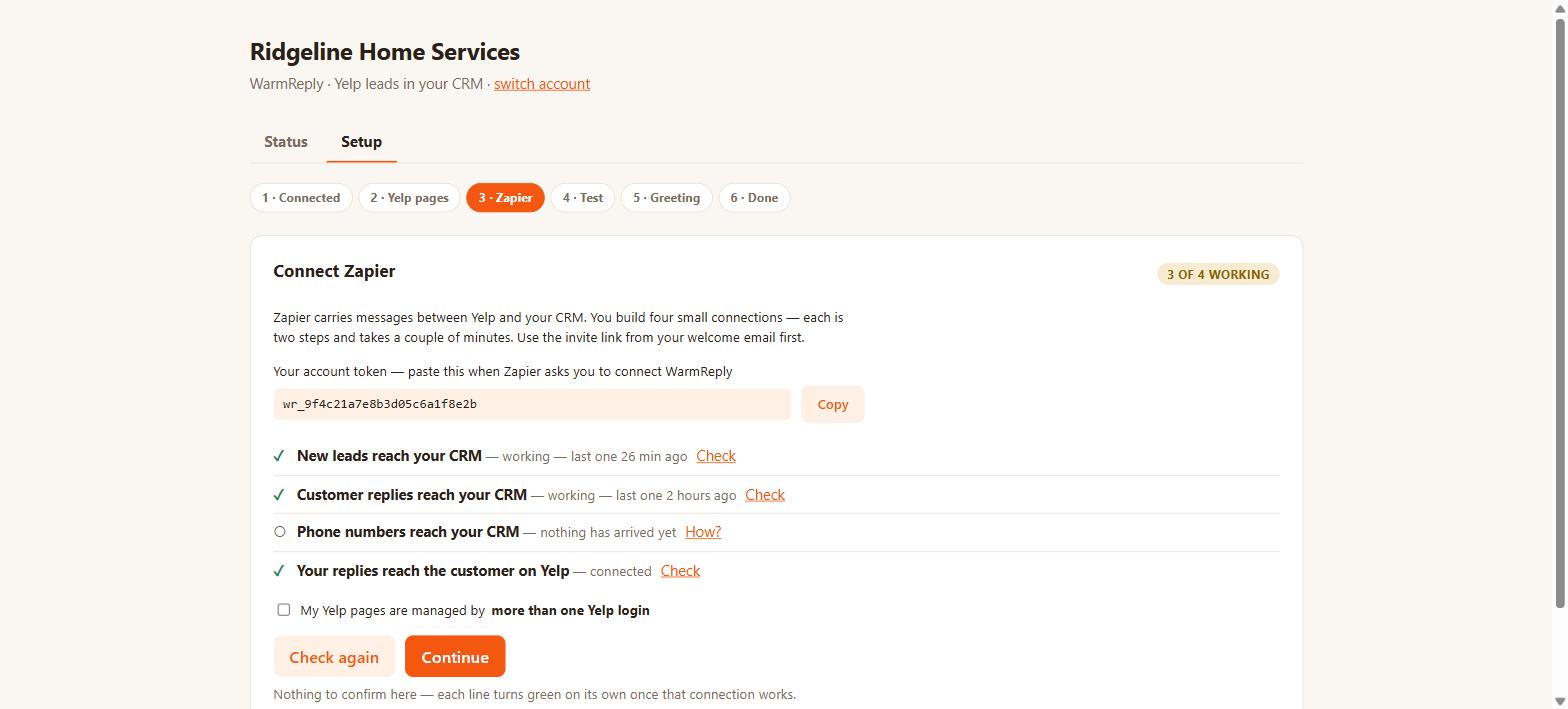
Zapier is how Yelp's official integration talks to anything else. You build four small connections once, during setup:
- New leads: a new quote request reaches your CRM.
- Customer replies: their follow-up messages reach your CRM.
- Phone numbers: a shared phone number reaches your CRM.
- Your replies: what your team writes gets delivered to Yelp.
Each is two steps and takes a couple of minutes. The setup screen inside your CRM shows which of the four are working and ticks each line off on its own, so you never have to guess whether one took.
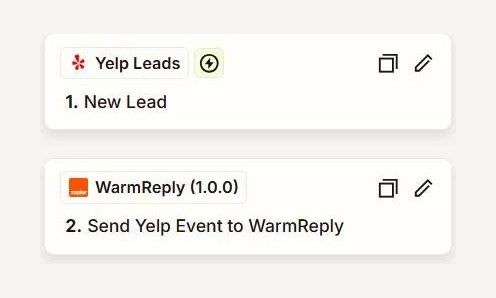
Cost. Currently nothing: Yelp covers all Zapier task costs for workflows that use its Yelp Leads integration — 500,000 free tasks a month, on any Zapier plan including the free one, with no planned end date. Every WarmReply connection is such a workflow, so your leads, messages and replies bill to Yelp's allowance rather than your plan's, and Zapier shows that usage as its own line on your task dashboard. This is Yelp's promotion, not ours: if it ever ends, Zapier's normal per-action billing would return (messages, not leads, count; a typical lead runs around nine actions; 750 actions is about $29.99 a month) — details on our pricing page, which is where we will say so before it costs you anything unexpected.
If you switch a connection off, that part stops immediately: leads stop arriving, or replies stop being delivered. Your CRM page will show it, and a reply that could not be sent is marked as failed rather than disappearing quietly.
Setting up
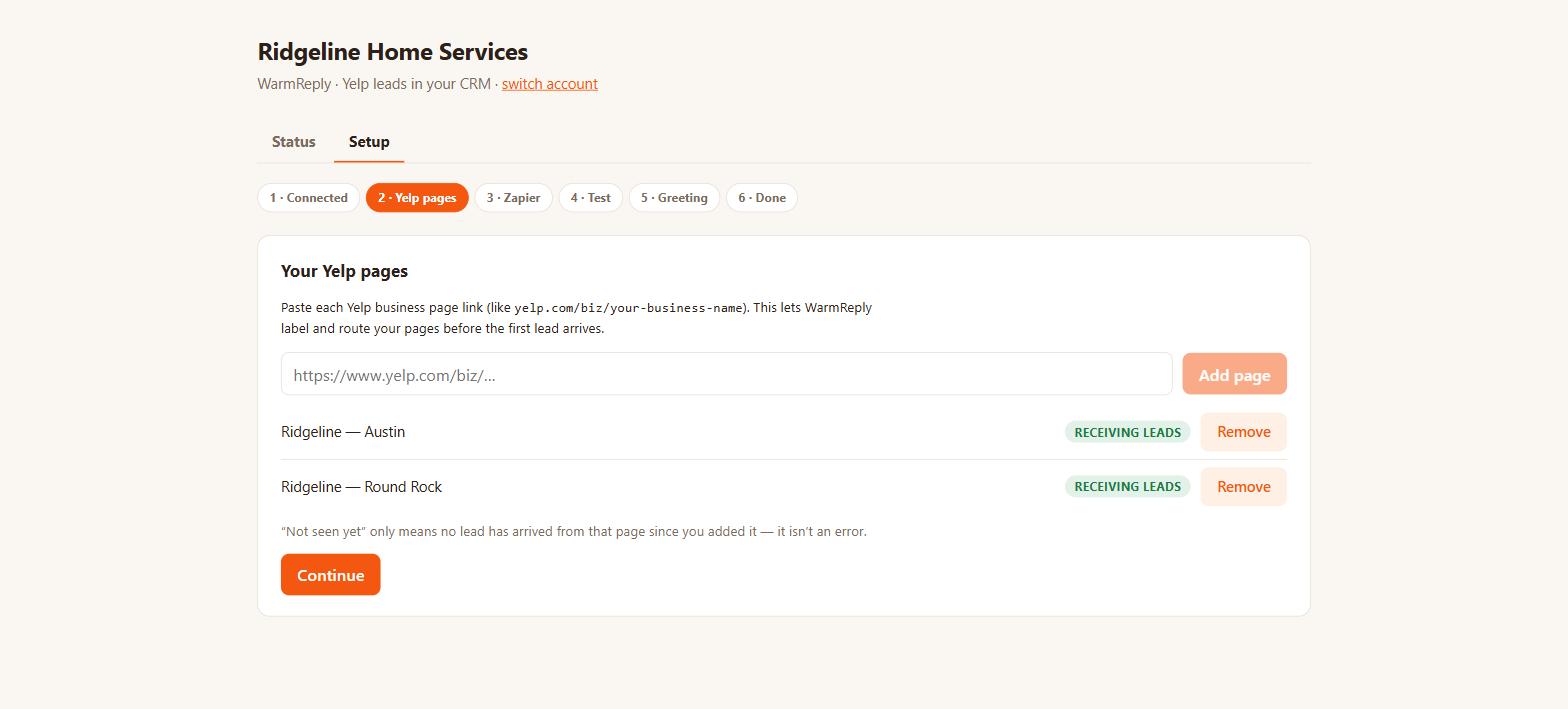
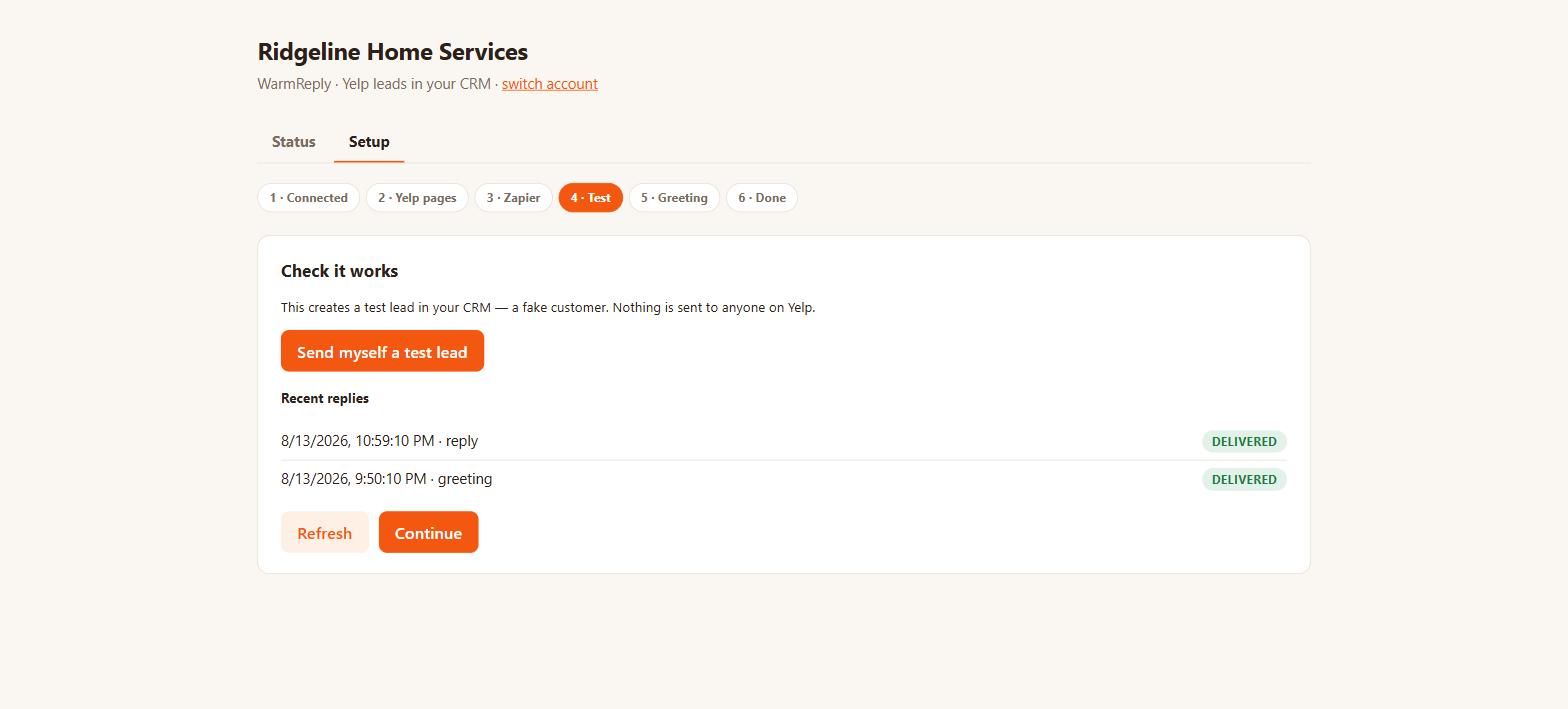
The full walkthrough with pictures is on the setup page. In short: install from the marketplace, add your Yelp page link, build the four Zapier connections (five with the recommended Yelp-app sync), send yourself a test lead, and optionally switch on the instant greeting. About fifteen minutes.
You need a claimed Yelp page with Request a Quote enabled, a HighLevel account, and a free Zapier account. You do not need Yelp Ads, a developer, or any code.
What lands in your CRM
Every Yelp lead becomes two things: a contact and a conversation.
The contact is created with the customer's Yelp display name, tagged
yelp-lead, with the source set to Yelp. Because Yelp masks email
addresses, we key the contact on a stable internal address of our own rather than
theirs. That is what keeps every future message attached to the same person
instead of creating duplicates.
These fields are saved on the contact, in a folder called WarmReply:
- Yelp Lead ID
- Yelp Business ID and Yelp Business Name: which of your pages it came from
- Job Type: what the customer asked for
- Project ZIP: the area of the job
- Requested Dates: when they want it
- Reply in Yelp (link): opens the original conversation on Yelp
Being ordinary contact fields, your workflows can use them: trigger on the tag, assign an owner, create an opportunity, send an email or SMS.
The conversation appears in Conversations on a channel called Yelp. The first message contains the job details and the customer's own words, including Yelp's question-and-answer list for that trade.
Replying to a customer
Open the conversation and reply as you would on any channel. The message is delivered into the Yelp thread, and the tick on the message tells you it arrived. If it could not be delivered, the message is marked failed with the reason.
Two limits worth knowing. A reply longer than about 3,000 characters is refused rather than cut short. You will see it fail, so you can shorten it and send again. And a workflow messaging action cannot send a reply through the Yelp channel: HighLevel does not support workflow messaging actions on a custom channel like ours. A workflow can do everything else with a Yelp lead; the reply itself comes from your team, the instant greeting, or HighLevel's Conversation AI if you enable it on the channel.
The instant greeting
A message sent automatically, within seconds, to every new lead, so you answer first even when the team is on a job. It is off until you turn it on.
You write the message, and these fields fill themselves in:
{{first_name}}: the customer's first name{{business_name}}: your business name, as you type it in the editor{{job_type}}: what they asked for{{project_zip}}: the job's area{{requested_dates}}: when they want it
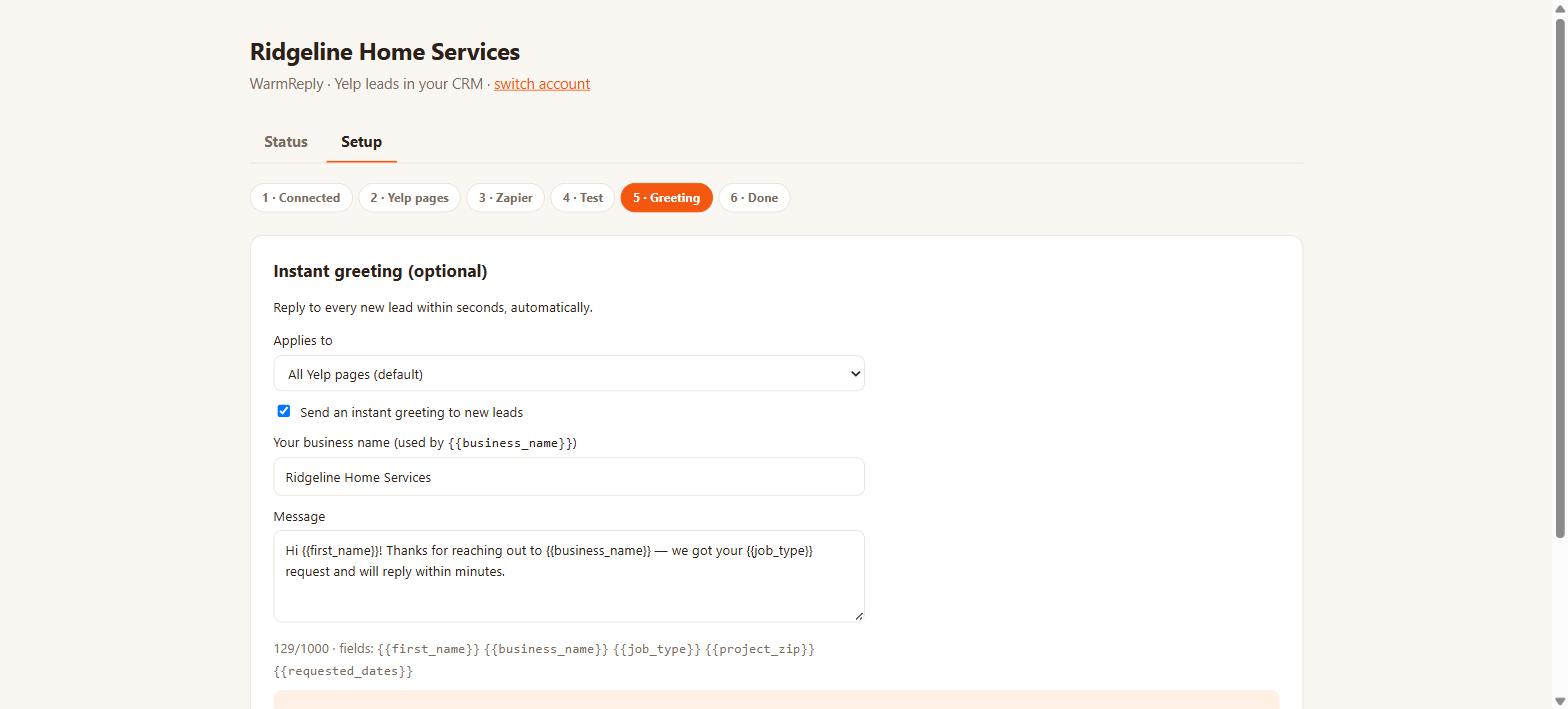
The editor shows a live preview of exactly what a customer will receive. If a field has no value for a particular lead, it is simply left out.
When it does not fire: on follow-up messages (only new leads), more than once for the same lead, and never for the test lead you send yourself during setup. With several Yelp pages you can write a different greeting per page, or leave one default for all of them.
Several Yelp pages
Add each page during setup by pasting its Yelp link. Every conversation is then labelled with the page it came from, and replies go back to that same page. Every plan includes unlimited Yelp pages, so the number you connect makes no difference to what you pay.
Several Yelp logins
Most businesses manage all their pages under one Yelp login, and nothing extra is needed. If your pages are split across different Yelp accounts (which happens when locations were claimed separately), there is one extra step: build the incoming connections once per login, and build the reply connection once per page with its Yelp Business field set to that page. Leaving that field empty in a multi-login setup sends replies through the wrong Yelp account. The setup screen asks whether this applies to you and shows the right instructions.
Agencies and sub-accounts
Install once at agency level and choose which sub-accounts to include; each is set up with its own connection automatically, and installing into further sub-accounts later is picked up on its own. Pricing is per sub-account, and HighLevel lets you resell at your own price.
One caveat worth planning around: if all your locations' Yelp pages sit under a single corporate Yelp login but each location needs its own sub-account, tell us: that arrangement needs a routing step we set up for you.
What the statuses mean
Opening WarmReply after setup shows this instead of the steps. Your team does not need it day to day; they work the leads in Conversations like any other channel.
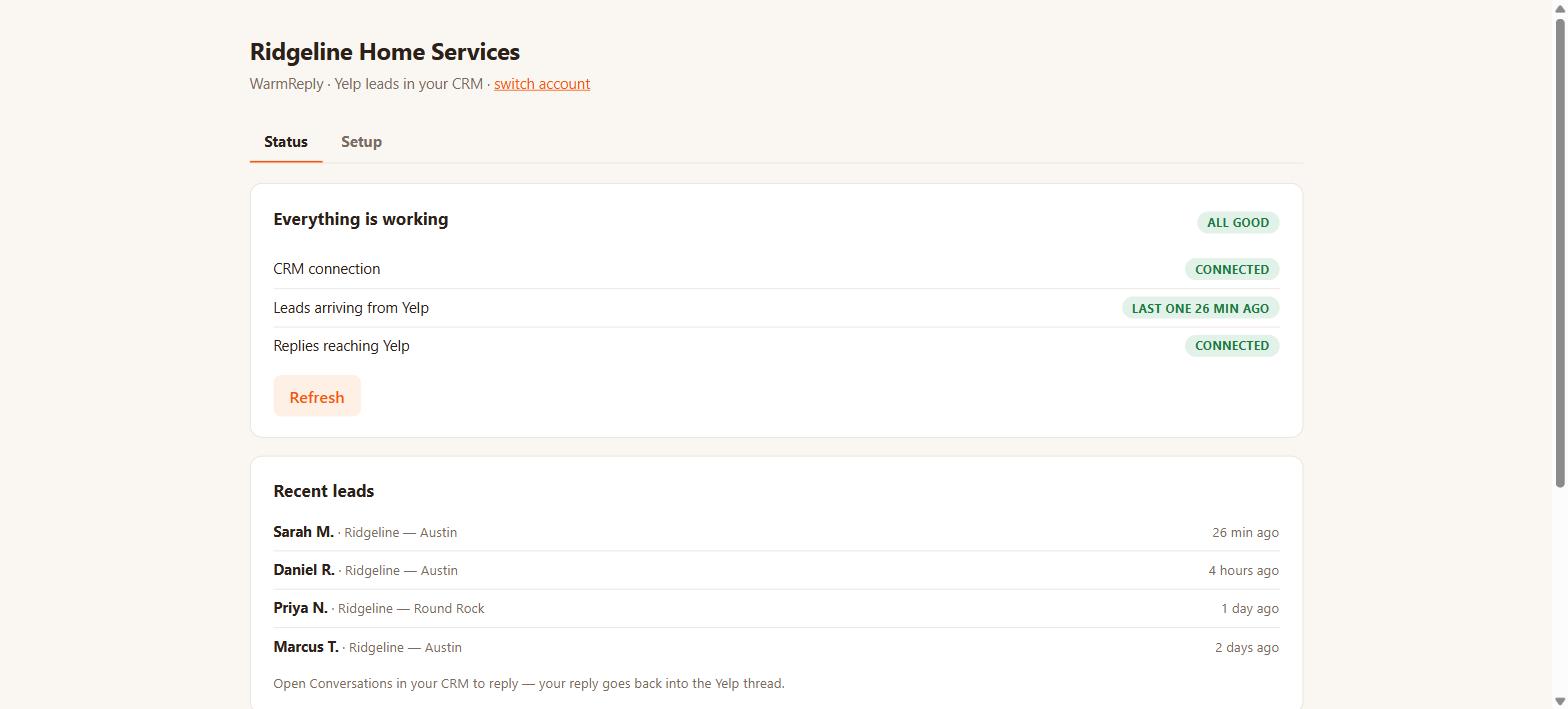
- Connected / working: for the three inbound lines, we have seen that part actually carry a real Yelp event, not just been told it was configured. The reply line is different: it turns green when Zapier subscribes the reply connection, which proves the Zap is switched on but not that a reply has reached Yelp. Nothing on this screen can prove that, because Yelp sends us no receipt, so the Zap history in Zapier is the place to confirm it.
- Nothing has arrived yet: set up but untested by real traffic. Not an error; it clears itself the first time an event of that kind arrives.
- Delivered: the reply was handed to Zapier successfully. Zapier then passes it to Yelp, and Yelp sends no receipt back, so this is the furthest point we can see. If the Zap itself fails after that, the message still reads delivered here; the Zap history in Zapier is where you confirm it landed.
- Failed: it did not, and the reason is shown. Failures are retried automatically for a while before giving up, and they are always visible.
- Not connected: that Zapier connection is off or was never built. Whatever depends on it is not happening.
When something goes wrong
The support page covers the common cases step by step. Broadly: your CRM page tells you which part is unhealthy, failed replies carry their reason, and we run automated checks several times a day so we often know before you do.
If you email [email protected] with your location name and roughly when it happened, that is enough for us to trace the exact lead through our delivery records.
Limits and things it does not do
- Existing Yelp conversations are not imported. Syncing starts with the next lead or the next message.
- Automations cannot send Yelp replies: a HighLevel restriction on custom channels, described above.
- Attachments stay on Yelp — Yelp’s messaging doesn’t carry files through its integrations in either direction. When a customer sends one, the conversation notes it so nothing slips by; open the lead in Yelp to view the file.
- Reviews, ads and other Yelp features are outside what this does.
Your data
We process your customers' messages to deliver them; that is the whole job. We do not sell data, do not use conversations for advertising, and do not train AI on them.
- Delivered reply texts are removed from our database as soon as delivery is confirmed; we keep the delivery status, not the words.
- A reply we could not deliver keeps its text for up to 90 days so it can be retried, then loses it too.
- The raw lead data Yelp sends is deleted after 30 days.
- Deduplication records and delivery events are cleared after 90 days.
- After you uninstall, there is a 30-day grace period in case you reinstall. After it, access to your CRM is dropped and we delete the conversation mappings we were holding for you.
- Conversations already in your CRM are yours and stay there. Ask and we will delete our copy at any time.
The full detail is in the Privacy Policy.
The plan, trial and cancelling
There is one plan: WarmReply, $49 a month launch pricing ($59 a month after the launch period — whichever price you join at is yours for as long as you stay). It includes unlimited Yelp leads, unlimited messages, unlimited Yelp pages, two-way sync, the instant greeting and the lead details saved as contact fields. Everything else about money is on the pricing page.
There is no lead limit and no per-lead charge. We don't count your leads against anything; a busy month costs the same as a quiet one, and nothing is ever cut off, queued or dropped. Billing is handled by the HighLevel marketplace against your HighLevel account; we never see card details. The plan starts with a 14-day free trial.
Cancel any time from the marketplace. Billing stops at the end of the paid period and syncing stops with it.